Running AI locally used to require a workstation full of GPUs. Not anymore. IBM’s Granite 4.0 Nano models are specifically engineered to run efficiently on ordinary laptops, including CPU-only machines, low-power devices, and edge systems.
This guide walks you step-by-step through installing, running, and optimizing Granite Nano on your own laptop — whether you’re a developer, researcher, or simply curious about small language models.
By the end of this article, you’ll have Granite Nano running locally and responding to your prompts without needing cloud APIs or expensive hardware.
Why Granite 4.0 Nano Runs Well on Laptops
Most LLMs are too large for personal hardware because they rely heavily on GPU-based attention operations.
Granite Nano avoids that problem with:
- Hybrid Mamba–Transformer architecture (CPU-friendly)
- Very small parameter sizes (350M–1B)
- Open-source Apache 2.0 license
- Support for quantization down to 4-bit
This means you can run a modern AI model locally with:
- 8GB RAM
- A mid-range CPU
- No dedicated GPU
Perfect for students, small businesses, and developers experimenting with edge AI.
Step 1 — Install Dependencies
Option A — Using Python + Transformers + Hugging Face
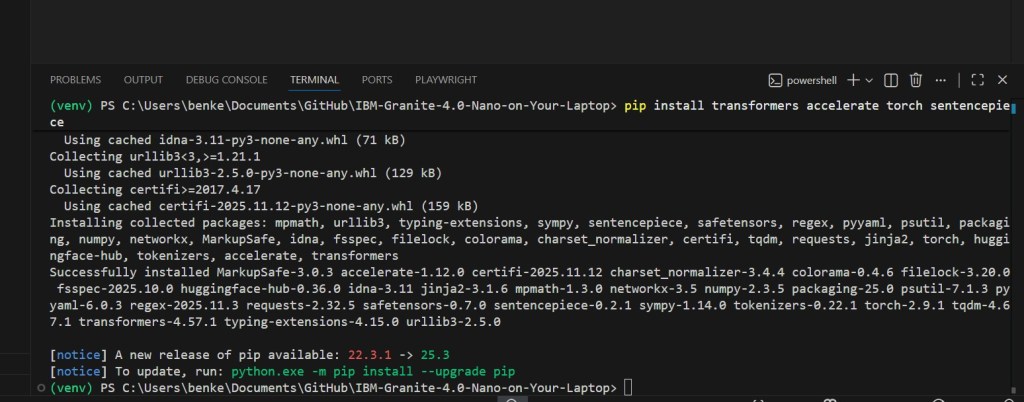
Install dependencies:
pip install transformers accelerate torch sentencepiece
If you want fast CPU inference:
pip install optimum

Step 2 — Download Granite 4.0 Nano from Hugging Face
For example, the 1B model:
from transformers import AutoModelForCausalLM, AutoTokenizer

model_name = "ibm-granite/granite-4.0-1b-nano"

tokenizer = AutoTokenizer.from_pretrained(model_name)
model = AutoModelForCausalLM.from_pretrained(
    model_name,
    device_map="cpu",
)
Or load the 350M version:
model_name = "ibm-granite/granite-4.0-350m-nano"
Both will run on standard laptops.
I ran into some issues with the 1B model due to lack of memory resource. After switching back to the 350M the model runs just fine – even without quantization.
Step 3 — Generate Text
inputs = tokenizer("Explain how edge AI works:", return_tensors="pt")
outputs = model.generate(**inputs, max_new_tokens=150)
print(tokenizer.decode(outputs[0], skip_special_tokens=True))
Granite Nano produces:
- predictable, structured responses
- low hallucination rate
- fast CPU inference
Great for testing assistants, automation tools, and offline RAG systems.
The python source code for this article is available here on Github.
Step 4 — Enable Quantization (optional but recommended)
Quantized models significantly reduce RAM usage.
Using bitsandbytes (4-bit):
pip install bitsandbytes
model = AutoModelForCausalLM.from_pretrained(
    model_name,
    load_in_4bit=True
)
Expected RAM footprint:
| Variant | RAM After 4-bit Quantization |
|---|---|
| 350M | ~0.8–1.0 GB |
| 1B | ~1.8–2.0 GB |
This is ideal for laptops with limited memory.
Step 5 — Run Granite Nano with Text Generation UI (Optional)
If you prefer a GUI, use:
Ollama
Supports Granite Nano models with custom configs.
LM Studio
Load the Hugging Face model directly and run inference locally.
OpenWebUI
Connects easily to a local model server running Granite Nano.
These tools give you sliders, prompt history, system prompts, and a chat interface — no coding needed.
Step 6 — Build Something With It
Granite Nano is perfect for small, local projects:
- personal offline assistant
- document summarization
- email automation
- knowledge base search
- Python agent helper
- industrial edge automation
- mobile apps with on-device inference
Because the entire model runs on your machine, your data never leaves your laptop.
Troubleshooting Tips
1. Slow inference?
Use quantization or reduce max_new_tokens.
2. Memory errors?
Choose the 350M model or enable 4-bit loading.
3. CPU overheating?
Limit thread count:
export OMP_NUM_THREADS=4
4. Getting weird outputs?
Increase temperature or set top_p manually.
Final Thoughts
Running Granite 4.0 Nano on your laptop gives you a taste of what the future of AI looks like: fast, local, private, and inexpensive.
With zero GPU requirements, open licensing, and strong enterprise performance, Granite Nano is one of the most accessible small models available today — and an ideal starting point for anyone exploring edge and local AI development.
 Nano Language Models